The Best Way to Read Ebooks on a Tablet in 2027: Set Up the Glass, the Page and the Habit
Make your tablet read like a book in 2027: matte screens, smart lighting, line length, stylus notes and spoiler-safe AI help, step by step with Ebokio.
A tablet can do almost anything, and that is the first problem a reader has to solve. The screen that holds chapter nine also holds your inbox, a group chat and a streaming app that remembers where you stopped. Read on it without a plan and the book loses every small contest for your attention.
The best way to read ebooks on a tablet in 2027 is to make the device behave like a book for as long as the chapter lasts. That takes about ten minutes of setup across seven layers: the glass, the light, the page, your hands, the quiet around you, the help you call on, and the shelf your books live on. This guide walks through each one with Ebokio as the reading platform, because its reader runs in any tablet browser and keeps most of these controls a tap away.
The Short Answer
-
Read on a matte or low-glare screen, or fit a matte screen protector.
-
Match brightness to the room and save warm themes for the evening.
-
Keep each line between 50 and 75 characters by adjusting margins and text size.
-
Hold the tablet in portrait for novels. Use landscape for wide pages or notes side by side.
-
Silence notifications with Focus or Do Not Disturb before you open the book.
-
Call on spoiler-safe AI help when you lose a thread, not as a stand-in for the chapter.
-
Buy books you can still open on the tablet you own two years from now.
What Is Ebokio?
Ebokio is a UK-based online ebook store and digital library at ebokio.com, run by EBOKIO LTD in London. You buy EPUB ebooks and read them in the Ebokio web reader on a phone, tablet or computer. There is no app to install, and the books carry no DRM. The reader handles themes, typography, highlights, margin notes, freehand drawing and read-aloud.
A premium layer called Ebokio Plus adds AI tools: smart summaries, side-by-side comparison, AI text to speech and Ask This Book for eligible titles you own. The free-to-try AI Librarian recommends books from a plain-language request in English, French or German. Writers reach the same readers through Ebokio Publishing.
Tablet or E-Reader? Be Honest About the Trade
E Ink readers still win two contests: battery life measured in weeks, and comfort in direct sun. A tablet wins most of what a modern reader asks for. Colour covers and illustrations look the way the designer intended. Comics, cookbooks, travel guides and textbooks full of diagrams make sense on a bright, fast screen. A stylus turns the margin into a workspace. And a tablet already sits on many coffee tables, so the cheapest reading device is often the one you own.
If you are still choosing between the two, our guide to the best e-readers to buy covers the E Ink side. This article assumes the tablet has won and shows how to get the most from it.
Layer 1: The Glass
The glass decides more about comfort than the processor ever will. Three choices matter.
Size and weight
Eight-inch tablets suit one-handed reading on a commute. Ten- and eleven-inch models are the sweet spot for most books: a portrait page at a comfortable text size, light enough for an evening on the sofa. Thirteen-inch tablets shine for comics, sheet music and PDFs with diagrams, but they ask for a stand or a cushion under your wrist.
Matte beats mirror
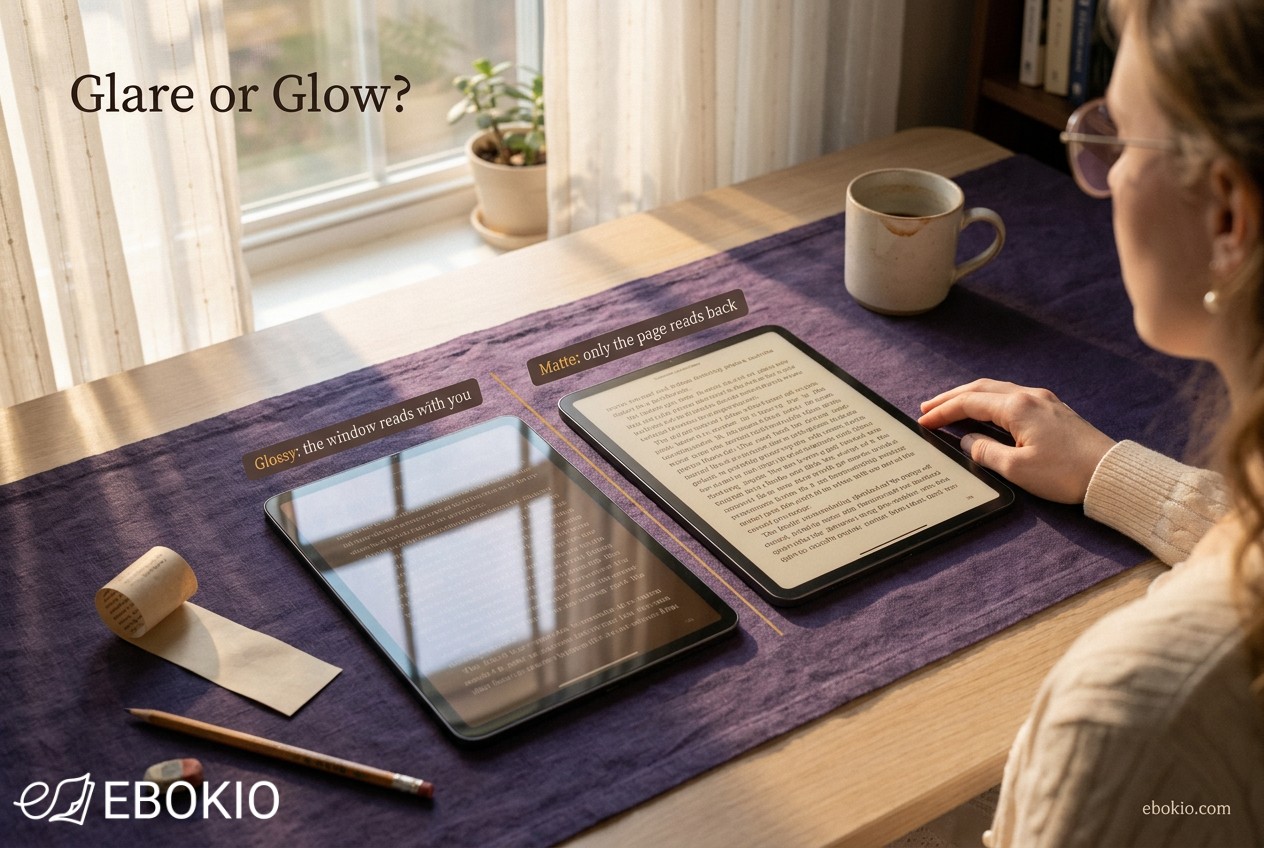
A glossy screen reflects every lamp in the room. A matte finish scatters that light so the text stays in front. TCL’s NXTPAPER tablets put a matte, paper-textured layer over an LCD panel (Android Central), and the NXTPAPER 4.0 generation adds flicker-free DC dimming (Yanko Design).
Apple’s answer is nano-texture glass on the iPad Pro, etched at a nanometre scale to scatter ambient light (MacRumors). It comes only with the 1TB and 2TB configurations, which puts the cheapest 11-inch M5 model with it at $1,699 in the US (Cult of Mac). A matte screen protector is the budget route. It cuts reflections at the cost of a little sharpness.
OLED or LCD
OLED panels show true black, so Ebokio’s night mode becomes light text on darkness with no grey glow around it. That suits a dark bedroom. LCD panels, matte ones in particular, cope better under bright ceiling lights. If your eyes tire faster on one tablet at low brightness than on another, flicker could be the cause, and a panel with DC dimming is worth trying.
Layer 2: The Light
Most eye discomfort on tablets comes from three habits: a screen brighter than the room, long stretches without a break, and forgetting to blink. The American Academy of Ophthalmology explains that we blink less when we stare at screens, which dries the surface of the eye. It recommends the 20-20-20 rule: every 20 minutes, look at something 20 feet away for 20 seconds. The same academy does not recommend blue-light-blocking glasses, because there is no scientific evidence that blue light from screens causes eye strain or damages the eye (AAO).
Use that knowledge to set up Ebokio’s themes with a purpose:
-
Daylight theme for bright rooms, with the tablet’s brightness close to the light around you.
-
Sepia for evening lamp light. The warmer page sits closer to the colour of the room.
-
Night mode for dark rooms, so the page stops glowing like an open window.
-
A custom palette when none of these fits. If pure white feels harsh, try a soft grey or cream background with dark grey text.
Warm night settings belong to your sleep routine more than to your eyes. Night modes shift screen light toward the warmer end of the spectrum (UCLA Health), which is a reason to switch them on in the hour before bed, not a cure for tired eyes at noon.
Ebokio adds an option that paper never had. When your eyes need a longer rest, switch to AI read-aloud for a chapter, where the title supports it, and keep the story moving while you look out of a window.
Layer 3: The Page
Typography is where tablet reading is won or lost, and most people never open the settings. The Baymard Institute puts the most readable line length for body text at 50 to 75 characters (Baymard Institute). A large tablet in landscape with small type can stretch a line far past that range, and your eyes start hunting for the beginning of the next one.
The Ebokio reader lets you set the typeface, text size, margins and line height, so you can pull the text block back into shape:
-
Widen the margins until a line holds about ten to twelve words.
-
Raise the line height when you shrink the text. Small type packed into tight lines wears you out.
-
Choose a typeface with open, rounded letters for long fiction. Serif or sans is a matter of taste on today’s sharp screens.
-
Pick a page mode. Tap the edge of the screen to turn pages in a novel, or switch to continuous scroll for nonfiction you skim.
Starting settings for common tablet situations
|
Situation |
Orientation |
Ebokio page mode |
Theme |
Layout tip |
|---|---|---|---|---|
|
Novel on the sofa, 10 to 11-inch tablet |
Portrait |
Tap to turn |
Daylight or sepia |
Medium margins, line height one step above default |
|
Bedtime chapter |
Portrait |
Tap to turn |
Night mode |
Lower brightness, slightly larger text |
|
Nonfiction with notes |
Landscape, split screen |
Continuous scroll |
Daylight |
Wide margins to keep lines short |
|
Long session on a 13-inch tablet |
Portrait on a stand |
Tap to turn |
Custom soft palette |
Larger text, generous line height |
|
Commute on an 8-inch tablet |
Portrait, one hand |
Tap to turn |
Sepia |
Narrow margins so each line holds enough words |
Layer 4: Your Hands
A tablet is heavier than a dedicated e-reader, and weight decides how long you read before your wrist complains. Prop it on a folio stand or a cushion, and change your grip at chapter breaks.
Turn the stylus into a pencil in the margin
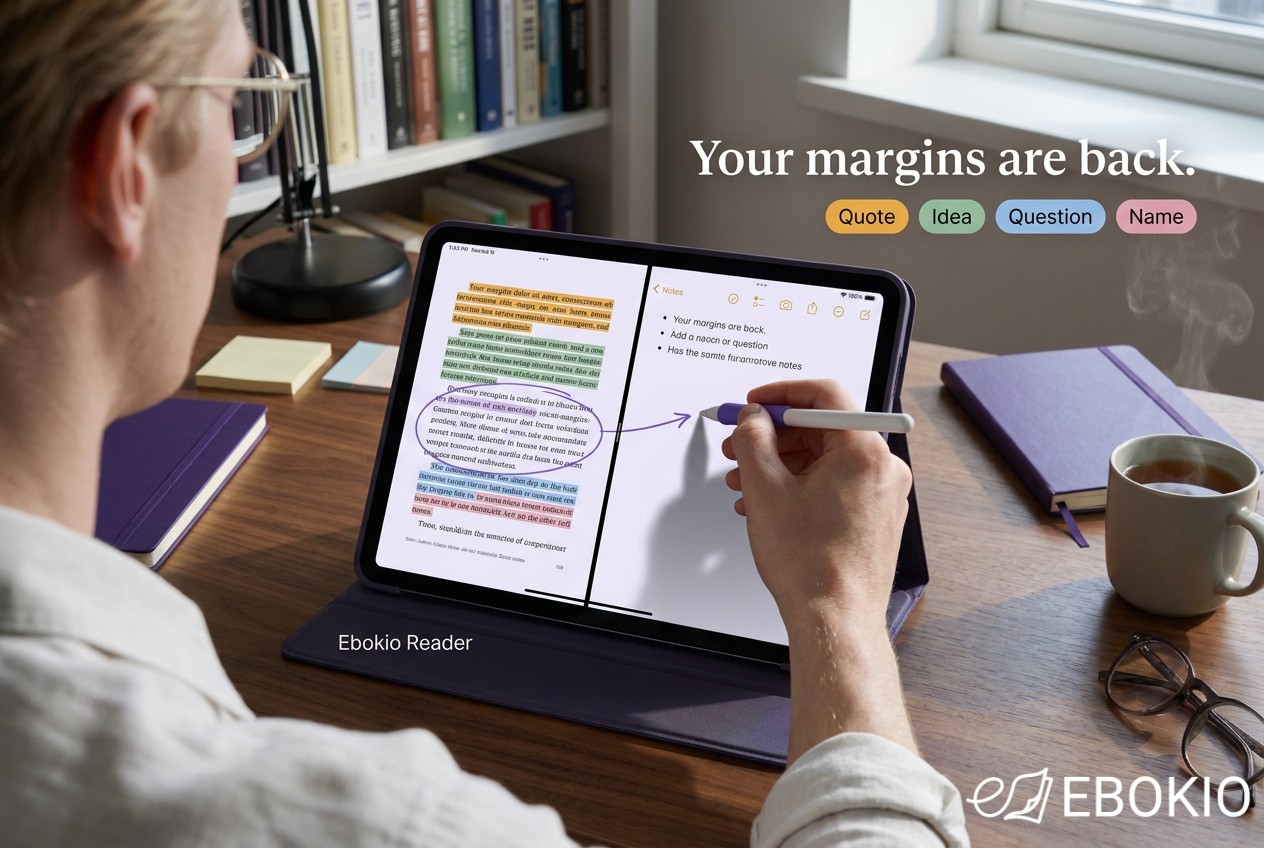
This is where a tablet pulls ahead of most E Ink readers. Ebokio’s reader supports highlights in several colours, margin notes, bookmarks and freehand drawing over the page. With a stylus in hand, you can circle a line, draw an arrow between two paragraphs, or sketch the floor plan of a manor house while the detective describes it.
Give each highlight colour one job and keep it: one for lines worth quoting, one for ideas to act on, one for questions to check later, one for names and places. When you finish, export your highlights and notes to a document from the reader. A weekend of reading becomes a page you can search, print or bring to your book club. If you keep a reading log, pair the export with one of these ways to track your reading.
Use split screen on purpose
iPadOS and Android both let two apps share the screen. Put Ebokio on one side and a notes app on the other when you read for study or work. Keep fiction full-screen. Ebokio’s built-in translate and define tools answer most quick questions about a word without sending you away from the page.
Layer 5: The Quiet
A notification sliding over a paragraph does the same damage as a person tapping your shoulder mid-sentence. Build a wall before you start:
-
Turn on Focus on iPad or Do Not Disturb on Android for reading time, and allow calls only from the people who matter.
-
Put Ebokio on your Home Screen. In Safari on iPad, open ebokio.com, tap Share, then Add to Home Screen. In Chrome on Android, open the menu and choose Add to home screen. One tap now opens your library, with no detour through a browser full of open tabs.
-
Close the other tabs before a long session.
-
Fill the silence when you can’t find any. Ebokio’s reader includes ambient soundscapes, handy on a train or in a busy flat.
-
Check the reading time before you start. Each Ebokio book page lists the word count and an estimated reading time, so you can pick a novella that fits a two-hour flight.
Looking for the right corner to read in? Our guide to the best places to enjoy reading has ideas.
Layer 6: Help That Respects the Plot
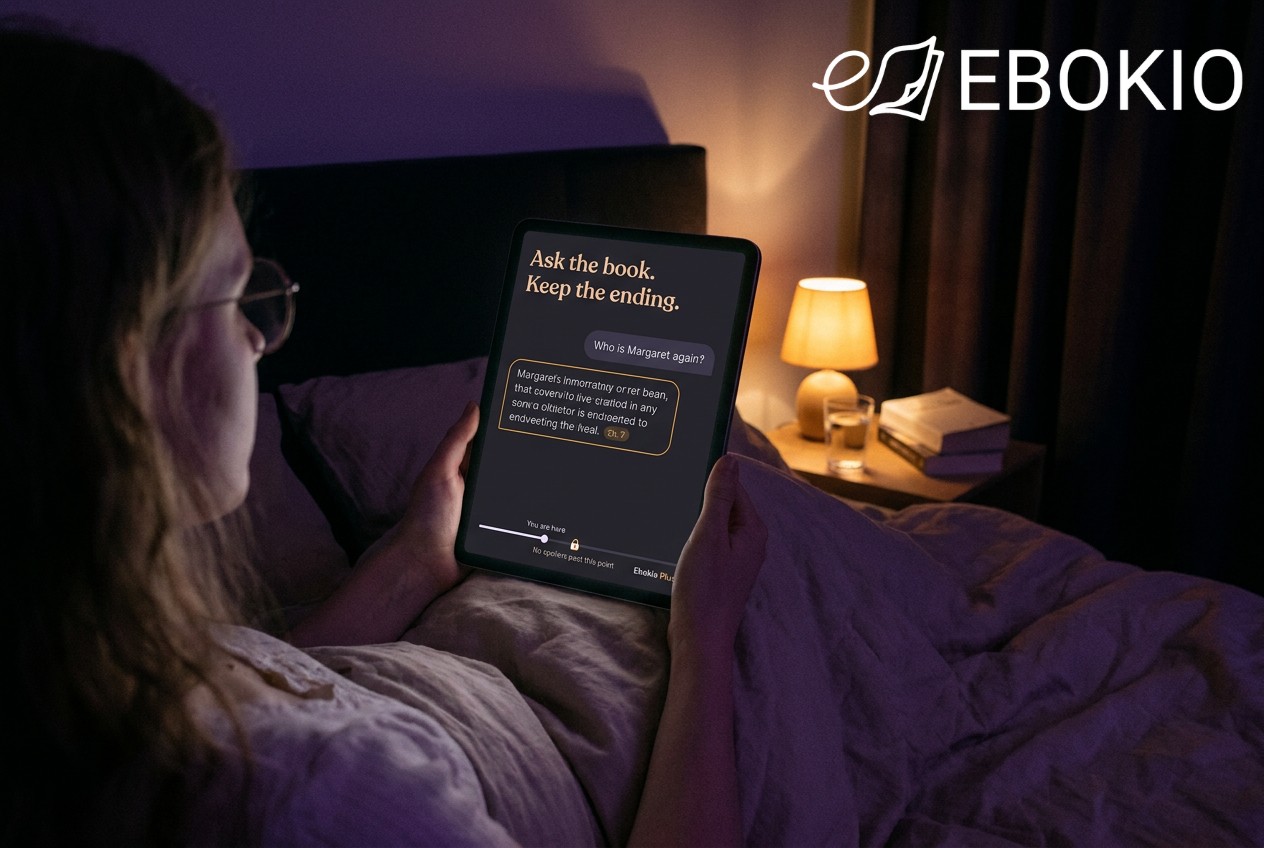
Long novels and busy weeks share a problem: you come back to a book and can’t remember who Margaret is. A tablet is online, so help is one tap away. The risk is help that reads ahead of you.
Ebokio Story Map vs Kindle X-Ray
Kindle’s X-Ray lists characters, places and terms in supported books. It doesn’t cover every title, it skips sideloaded books, and it can show spoilers at times (BGR). Ebokio’s Story Map tracks characters, places and turning points. Those turning points make the difference. You see where the plot changed direction, not only who passed through it, which is what you need after a three-week gap in a 600-page saga.
Ask This Book on Ebokio vs Ask this Book on Kindle
Amazon launched its own Ask this Book in December 2025, in the US Kindle app for iOS, covering thousands of English-language bestsellers (Engadget). In August 2026, SlashGear reported it was still limited to US users and offered an “Ask full book” option alongside the default spoiler-free mode (SlashGear). By late October 2026 it had started reaching some 2026 Kindle e-readers, with regional availability still unclear (TechRadar).
Ebokio’s Ask This Book answers questions from the text of the book, cites the passages it used, and never spoils past the point you have reached. Because it lives in the browser reader, it behaves the same on an iPad, an Android tablet or a Windows convertible. No app store or operating system decides who gets it. It is available for eligible titles you own through Ebokio Plus.
The citations matter. An AI answer without a source asks for your trust. An answer that points back to the page lets you check it in seconds.
Summaries and comparisons for nonfiction
Ebokio Plus also offers smart summaries and side-by-side comparison. For readers of business, history or self-help, that means a quick recap of a chapter before a meeting, or two books’ arguments laid next to each other before you decide which one to finish. Use summaries to review what you have read, not to skip it.
Choosing the next book
Browsing a store on a tablet invites endless scrolling. The AI Librarian works more like a talk with a bookseller. Describe a mood, a length, a budget or an author you loved, and it suggests matching cheap, free and premium ebooks from Ebokio’s live catalogue, in English, French or German. For free reading beyond the store, see our list of places to find free ebooks.
Layer 7: The Shelf
The best setup in the world is wasted if your library can’t follow you to your next tablet. Ownership is a reading decision, not a legal footnote.
Two examples show the risk. Apple Books runs only on Apple devices, so an iPad library stays behind if your next tablet runs Android (Popular Science). Amazon removed the Download & Transfer via USB option on 26 February 2025, the route Kindle buyers had used to save copies of purchased books to a computer (The Verge).
Ebokio takes the opposite path. Its ebooks carry no DRM and open in the web reader on any modern browser, so moving from an iPad to an Android tablet means signing in, not starting over. For a closer look at what you own when you buy a digital book, read What Is an Ebook? The File, the Licence and the Room You Read In.
Ebokio vs the Kindle App on a Tablet
|
Feature |
Ebokio in a tablet browser |
Kindle app on a tablet |
|---|---|---|
|
Getting started |
Nothing to install. Opens in Safari, Chrome or any modern browser |
Install the app from the App Store or Google Play |
|
Spoiler-safe questions |
Ask This Book answers from the text with citations and stops at your reading position (eligible owned titles, Ebokio Plus) |
Ask this Book launched in the US iOS app; includes an “Ask full book” option; wider rollout still under way in late 2026 |
|
Keeping track of the story |
Story Map: characters, places and turning points |
X-Ray: characters, places and terms; not available for every book |
|
Marking up the page |
Multi-colour highlights, margin notes, bookmarks, freehand drawing, export to a document |
Highlights, notes and bookmarks |
|
Your files |
No DRM |
Download & Transfer via USB removed on 26 February 2025 |
Your First Ten Minutes on Ebokio
-
Open ebokio.com in your tablet’s browser and sign in.
-
Add it to your Home Screen.
-
Find a book. Ask the AI Librarian, browse new ebooks, or explore the full catalogue by category. Note the reading time on the book page.
-
Open the book in the reader and pick a theme for the room you’re in.
-
Set the typeface, text size, margins and line height until a line holds ten to twelve words.
-
Choose tap-to-turn pages or continuous scroll.
-
Decide what each highlight colour means before you make the first mark.
-
Turn on Focus or Do Not Disturb, then read one full chapter before you change anything else.
Five Habits That Undercut Tablet Reading
-
Full brightness in a dark room. The page turns into a lamp pointed at your face.
-
Landscape with edge-to-edge lines. Your eyes lose their place at every line break.
-
Notifications left on “just in case”. One banner costs you the paragraph and the mood.
-
A library locked inside one company’s app. Your next tablet may not run it.
-
Asking AI to replace a chapter. Use it to explain what you read, not to skip what you haven’t.
A tablet will never turn into paper, and it doesn’t need to. Set the glass, the light and the page once, guard the quiet, and let spoiler-safe tools carry you back into a story after a hard week. Open a chapter in the Ebokio reader tonight and change only what bothers you.
Frequently Asked Questions
Is a tablet or an e-reader better for reading ebooks in 2027?
An E Ink reader is better for battery life and for reading in direct sun. A tablet is better for colour, illustrated books, comics, textbooks and stylus notes. If you read both novels and visual books, a tablet with a matte screen and warm evening themes covers more ground.
What size tablet is best for reading ebooks?
Ten to eleven inches suits most readers: a full portrait page at a comfortable size without the weight of a 13-inch model. Choose eight inches for one-handed commuting and 13 inches for comics, sheet music or PDFs.
Do I need an app to read Ebokio ebooks on an iPad or Android tablet?
No. Ebokio ebooks open in the web reader in any modern browser. Add ebokio.com to your Home Screen for one-tap access.
How can I reduce eye strain when reading on a tablet?
Match brightness to the room, follow the 20-20-20 rule, remember to blink, keep lines short with wider margins, and use sepia or night mode when the room is dim. If discomfort persists, book an eye exam.
Does night mode protect my eyes?
Night mode is a sleep tool more than an eye tool. The American Academy of Ophthalmology says there is no scientific evidence that blue light from screens causes eye strain or eye damage. Breaks and comfortable brightness do more for your eyes.
Can I write on Ebokio ebooks with a stylus?
Yes. The Ebokio reader supports freehand drawing over the page, multi-colour highlights and margin notes, and you can export your highlights and notes to a document.
Will Ebokio’s Ask This Book spoil the ending?
No. It answers from the text with citations and does not go past your current reading position. It is available for eligible titles you own through Ebokio Plus.
Are Ebokio ebooks DRM-free?
Yes. Ebokio states that its ebooks carry no DRM, so your library is not tied to one device or one app.
Notes
-
Ebokio Plus features such as AI read-aloud, summaries and Ask This Book work where supported. Ask This Book applies to eligible titles you own.
-
Details about Kindle, Apple Books and tablet hardware reflect public reporting up to early November 2026. Features, regions and prices change, so check with the vendor before you buy.
-
Prices quoted are US list prices from the cited report.
-
The eye-comfort tips here are general guidance, not medical advice. Persistent headaches, blurred vision or dry eyes deserve a visit to an optometrist or ophthalmologist.
-
The settings in the table are starting points. Adjust them to your eyes, your tablet and your room.
Sources
-
Ebokio, homepage: ebokio.com
-
Ebokio, The Ebokio reader: ebokio.com/reader
-
Ebokio, Ebokio Plus AI reading tools: ebokio.com/ebokio-plus
-
Ebokio, AI Librarian: ebokio.com/ai-librarian
-
Ebokio, Help Centre: ebokio.com/help
-
Ebokio Publishing: publishing.ebokio.com
-
American Academy of Ophthalmology, “Nation’s ophthalmologists offer tips for easing eye strain from too much screen time”: aao.org
-
Baymard Institute, “Readability: The Optimal Line Length”: baymard.com
-
UCLA Health, “Block screens’ blue light to get better sleep”: uclahealth.org
-
Android Central, “TCL NXTPAPER 4.0 fixes one of the technology’s biggest hidden issues”: androidcentral.com
-
Yanko Design, “TCL NXTPAPER 11 Plus could give e-book readers a run for their money”: yankodesign.com
-
MacRumors, “Hands-On With the iPad Pro’s Nano-Texture Glass”: macrumors.com
-
Cult of Mac, Apple nano-texture glass buying guide: cultofmac.com
-
BGR, “4 Cool Features That Are Exclusive To Kindle”: bgr.com
-
Engadget, “Kindle’s in-book AI assistant can answer all your questions without spoilers”: engadget.com
-
SlashGear, “The Kindle App For iPhone & iPad Has Features Amazon’s Own E-Readers Don’t” (August 2026): slashgear.com
-
TechRadar, “Amazon’s ‘Ask this book’ feature is finally rolling out to Kindles”: techradar.com
-
The Verge, “Amazon will stop allowing Kindle book downloads to your PC soon”: theverge.com
-
Popular Science, “The best apps for reading books on your phone”: popsci.com
Related articles
- What Is an Ebook? The File, the Licence and the Room You Read In – What is an ebook? Learn how formats, DRM and reader tools shape what you buy, and how Ebokio’s DRM-free EPUBs, Story Map and Ask AI improve every read.
- The Ebook You Actually Keep: A Reader’s Guide to Buying, Owning, and Reading Digital Books on Ebokio – What do you really get when you buy an ebook? Learn about DRM, licences, screen reading, and how Ebokio’s DRM-free browser reader keeps your books yours.
- Read More, Spend Less: The Reader’s Playbook for Finishing 20+ Books a Year on a Tight Budget – Finish 20+ books a year without draining your wallet. Cheap ebook deals, free shelves, read aloud, and AI picks from the Ebokio AI Librarian. Start today.
- The eReader for People Who Gave Up on eBooks – Hate eReaders? The problem is usually the store, the DRM, or the price — not the screen. Five objections tested, and the reader that answers them without...
Ebooks to explore
- The First Moira by Desislava Vasileva
- The Ninth Plate by Desislava Vasileva
- THE SEED OF ETERNITY by Desislava Vasileva
EBOKIO LTD · Registered in England and Wales · Company No. 17308940 · Registered office: 128 City Road, London EC1V 2NX, United Kingdom